BUSY Bar is a productivity multi-tool with an LED pixel screen for custom statuses. Built-in Pomodoro timer and apps. Fully customizable, open-source, and hacker-friendly

Productivity tool
Distraction blocker, custom BUSY message, focus timer, cross-platform sync

Apps and integration
App Library, connection to 3rd-party software, integrations with calendar events and calls

Smart home support
Connect to Google Home and Apple Home via the Matter protocol

Developer-friendly
Open HTTP API, open-source firmware, Python & TypeScript libs, MQTT, no vendor lock-in
Productivity multi-tool


BUSY focus timer
Pomodoro timer and distraction blocker for deep focus workflow
-
Notification blocker on iPhone / Android
-
Integration with 3rd-party apps
-
Customizable BUSY automations
-
Smart Home integration

Custom status
Design your own BUSY status message
-
Display LED status: choose from the library or create a custom one
-
Add a timer for focused work: simple or interval
-
Auto-activation by microphone, camera, or app
>_ Developer-friendly
Developers can integrate BUSY Bar into any system using the open API
> Open HTTP API
> Libs for Python/TypeScript
> Offline API (no internet required)
> Self-hosted cloud control
> USB Virtual LAN
> Apps for macOS, iOS and Android
> Web interface over USB and Wi-Fi
Show you’re BUSY
Stop others from interrupting your deep focus. The display shows you’re busy and when you’ll be free again.

Instant activation
Start and stop the BUSY status manually with a large button. Works completely offline, with no extra software required.

Set timer
Set an optional expiration timer using the scroll wheel to let others know when you’ll be available again.

Automatic BUSY status
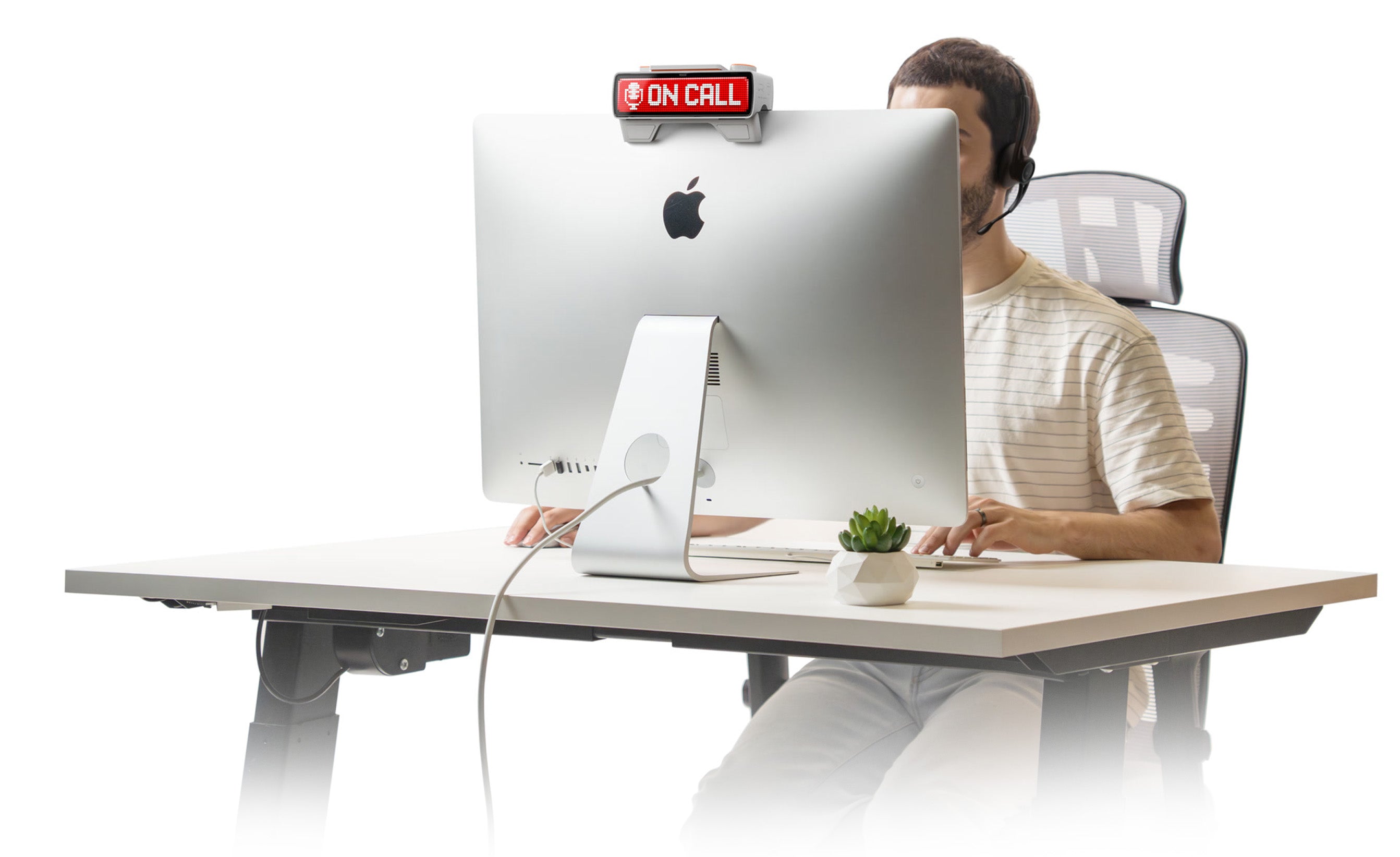
BUSY Bar integrates with desktop software and automatically activates when you’re on a call, live on stream, recording audio, or when a certain program is active.

Automatic ON CALL status
When the microphone is activated on your computer, BUSY Bar will automatically display an ON CALL status.

Streaming mode
When you’re streaming through any software like OBS (Open Broadcaster Software), BUSY Bar will automatically turn on.

Multi-platform support
Supports macOS, with Windows support coming soon.
Remote control over Wi-Fi
Control BUSY Bar remotely over the internet. Place it on the wall or door and use the desktop app to automatically activate the BUSY status when you’re on calls.


Manual controls
Physical buttons allow you to control the device manually without connecting to PC or the mobile app. The large buttons are designed for easy use without looking at the device.

Distraction Blocking Mode: displays status with a timer, blocks notifications and apps, and triggers smart home automation.

Active busy status message with custom design configurable for your own workflow

Apps
Clock, weather, social media stats (YouTube, Instagram, TikTok), and more. Supports 3rd-party user applications

Settings
Wi-Fi / Bluetooth connections, screen brightness, sound volume, power saving mode, etc.
Full control with buttons

Start / Pause button
Start and stop your status. Also works as an OK button in menu

5-position selector
Switch between modes

Scroll wheel
Set timer in Busy and Pomodoro modes, navigate in menu, OK button

Back button
Go back in menu and quit apps


Monochrome back screen
Eye-friendly back screen allows you to control the device and see the status displayed on the main screen — even when it’s turned away from you.
Interval focus timer
BUSY Bar is an advanced productivity timer inspired by the Pomodoro technique, which divides work into short intervals — 25‑minute work sessions followed by 5‑minute breaks.

New Pomodoro timer
We’ve redesigned the classic Pomodoro timer by combining it with a distraction blocker to help you stay focused and fight off notifications, social media, and other brain rot while you work.


We fight major focus killers

Endless scrolling
Brain-rotting content kills your focus. We block Instagram and TikTok while you’re in focus mode — so you can’t even open them.

People around
Just as you manage to concentrate, someone always tries to interrupt. BUSY Bar lets others know when you’re in deep focus — and when you’ll be available again.
Block distractions
BUSY Bar can automatically mute notifications on your
phone and PC when
BUSY mode is activated. It helps you stay focused by blocking distractions as you work.
Requires BUSY App integration (available for free):


Pause scrolling
Short videos on TikTok and Instagram flood you with
dopamine, making
it hard to focus. BUSY App can blocks these apps while you’re in deep focus.

Block any app
Select the apps you want to block during focus mode. You’ll stop receiving notifications and won’t be able to open these apps until the timer runs out.

Hardcore mode
Locks apps for the entire focus session with no way to bypass it. The only way to unlock them is a full phone reset. Coming soon.
Mute all devices
BUSY Bar integrates with the free cloud-based BUSY App infrastructure.
Block distractions across all platforms simultaneously, so nothing pulls you away while you’re focused. BUSY App works on your computer, phone, and smartwatch.
Smart home integration
Make your smart home react when you’re busy: pause music, turn on lights, and lock the door with just one button.
BUSY Bar supports Matter®, a modern smart home protocol that connects to Apple Home and Google Home.


What is Matter protocol?
Matter is a modern smart home protocol developed by Apple, Google, Amazon, and Samsung to address the issue of smart device incompatibility and security. Designed for seamless interoperability, Matter ensures that supported devices can easily integrate into all major smart home platforms without the need for additional apps or software.
We are a member of the Connectivity Standards Alliance (CSA-IoT), and our products are currently in the process of being certified to work with the Matter standard.

Home Assistant support
BUSY Bar can be natively integrated into Home Assistant via its HTTP API, serving as an automation trigger when you’re busy. It can also act as an output device triggered by actions from Home Assistant, such as displaying a message when your washing machine has finished its cycle.
Home Assistant is the most popular open-source smart home hub, with a wide range of integrations, powerful automation, and local control.


Developer-friendly
Right out of the box, BUSY Bar comes with an open API, ready for integration into your project.

Connect to your smart home system for seamless automation

Display custom messages and images using TypeScript or Python


Multiple network connectivity
Connect BUSY Bar to your project using the open API and any type of network connection: USB, LAN, or Cloud.

You can connect to BUSY Bar in the following ways:

Connect the device to your BUSY App account for remote access via the internet, or connect to your own server.
• Remote access behind the NAT
• Connect to any cloud via MQTT
• No vendor lock-in

Get full access to the HTTP API, web interface and Matter smart home protocol in your local network even if BUSY Bar has no internet access.

Connect to PC to create a Virtual LAN interface, allowing access to the local web interface and HTTP API without Wi-Fi or internet.


Open-source firmware
BUSY Bar runs on fully open firmware — the exact code we ship, published on GitHub under GPLv2.
Built to be extended. Every mode and service is open C on the FBT toolkit, with a documented SDK for building and loading custom apps alongside the built-in ones.
No lock-in, nothing hidden. The whole firmware is auditable, buildable from source, and free to fork — so BUSY Bar isn't tied to any single vendor.


Tech specs


Speaker
For sound notifications

LED Matrix
72×16 RGB
60 Hz refresh rate

Light sensor
For automatic brightness control


Battery
8 hours of active status

USB Type-C
For charging and PC connection

Main display
72×16 LED matrix
RGB with 16 million
colors
400 nits
Adaptive brightness
USB connection
Virtual Ethernet adapter
HTTP API via
USB Virtual LAN
Control via the desktop app
Battery
3250 mAh
Li-ion 18650 battery
8 hours of active status


Scroll encoder
Also a push button

Mechanical switch
Kailh Choc Switch V2

Status lights
Indicate active mode

Mode selector
Switch between 4 work modes

Wireless processor
Silicon Labs SiWG917 chip
Arm Cortex-M4
core
Wi-Fi 6 (IEEE 802.11ax)
Single Band 2.4 GHz
WPA3 authentication
support
Bluetooth Low Energy 5.4
Back display
Monochrome OLED
160×80 px
resolution
16 gray scales
Adaptive brightness
Mirrors the main display

Central processor
STMicroelectronics STM32U595
Ultra low
power MCU
Arm Cortex-M33 32-bit 160 MHz
2 MB Flash Memory
2.5 MB
RAM
Additional 8 GB eMMC storage

Built-in monitor mount
Place BUSY Bar on top of your desktop monitor so others can see your status.


What’s in the box
BUSY Bar
USB-C cable (2m)

Accessories
Wall mount

